Skip to content

CARE CONNECT · BY VIDENTIN

Your patients hear from you, before and after every visit.

automated patient communication

Care Connect helps dental practices create, personalize and automate patient communication with video.

For every dental specialty: General Dentistry, Periodontics, Endodontics, Oral Surgery, Prosthodontics, Implant Dentistry, Orthodontics and Pediatrics, with Kids Care Cast for your youngest patients.

CARE CAST

The explainer library, presented by you.

Each Care Cast is a full patient explainer, two to three minutes, with clear animations of the procedure. Dr. Winslow clinically reviews every master before release, and our virtual hosts, Alex and Jordan, present the library. Each one plays as a short lecture: your photoreal twin presents beside a board of clear animations, in the classroom or clinical setting you choose. Every plan includes the whole library, presented by our hosts, with new titles and updates as they're released. To present it yourself, add your own twin by specialty pack, the whole library or a monthly subscription, and only the presenter changes: the clinical content stays exactly as reviewed. Full 3D and Full photoreal versions are available as upgrades.

  • Play it chairside, send it home, or loop it in the waiting room.
  • Pairs with Care Clips. Where a Care Clip shows the same procedure, switch between the two in one tap.
  • Make your own explainers in Video Studio. They're labelled "Made by your practice".
  • Captions on every video, with other languages available.
  • Organized by specialty. Care Cast General Dentistry. Tell us your specialty when you sign up and your library, Send Center and In-office player open on your pack. Every plan includes every video, presented by Alex or Jordan.
  • No clone needed. Prefer not to clone a doctor, or presenting for a whole group? Choose Alex or Jordan as your presenter, on every plan.
Care Cast General Dentistry (1)
  • Dental Filling: What to Expect

KIDS CARE CAST · FEATURING SPARK THE DRAGON

Patient education made for kids to watch.

Kids Care Cast is an animated series for children ages 4 to 9, part of Care Cast Pediatrics. Spark the Dragon, a curious, warm friend, visits the dentist as the patient beside your 2D twin, and hosts his own short lessons on caring for teeth. Your twin welcomes Spark, explains each step and answers his questions, so children meet you as a friendly, recognizable dentist.

Spark's signature line: "Let's find out together!"

  • Made for ages 4 to 9, with captions and easy pause, replay and sharing with a grown-up.
  • Your 2D twin is the dentist in every story.
  • In Care Cast Pediatrics, featured first. Every plan includes every video, presented by Alex or Jordan.

CARE CLIPS

Show the procedure. Explain it in your own words.

Care Clips are short animations, 30 to 45 seconds, each focused on one procedure, with clear on-screen labels and no narration. Sit with your patient, play the clip and walk them through it yourself. Where a Care Cast covers the same procedure, switch to the full narrated explainer in one tap, and back again.

  • Silent, labeled and focused on one procedure.
  • A large Care Cast and Care Clip switch in the In-office player's chairside mode.
  • Organized by procedure, with related clips under each one.
Exams and Common Concerns (5)
  • 3D Dental Scan (CBCT)
  • Dry Mouth
  • Oral Cancer Screening
  • Your Checkup Exam
  • Your First Comprehensive Exam
Prevention and Home Care (8)
  • Fluoride Treatments
  • How to Brush
  • How to Floss
  • Manual vs. Electric Toothbrush
  • Plaque and Tartar
  • Sealants
  • Silver Diamine Fluoride
  • Water Flosser
Cavities and Fillings (8)
  • Decay Around an Old Filling or Crown
  • Failing Large Silver Filling
  • Failing Large Tooth-Colored Filling
  • How a Cavity Grows
  • Root Decay
  • Silver Filling: Back Tooth
  • Tooth-Colored Filling: Back Tooth
  • Tooth-Colored Filling: Front Tooth
Crowns, Inlays and Onlays (11)
  • Crown with Core Buildup
  • Crown: Digital Scan
  • Crown: Same-Day
  • Crown: Traditional Impression
  • Inlay: Digital Scan
  • Inlay: Same-Day
  • Inlay: Traditional Impression
  • Onlay: Digital Scan
  • Onlay: Same-Day
  • Onlay: Traditional Impression
  • Poorly Fitting Crown
Dental Implants (15)
  • Caring for a Dental Implant
  • Caring for an Implant Bridge
  • Dental Implants: Overview
  • Guided Bone Regeneration
  • Immediate Implant with Bone Graft
  • Implant Surgical Guide
  • Peri-Implant Mucositis
  • Peri-Implantitis
  • Ridge Augmentation (Widening the Jawbone)
  • Screw-Retained Implant: Back Tooth, Healing Cap
  • Single Implant: Back Tooth, Healing Cap
  • Sinus Lift: Crestal (Osteotome)
  • Sinus Lift: Crestal, with Implant Placement
  • Sinus Lift: Lateral Window
  • Socket Preservation (Graft After Extraction)
Full-Arch Implants (18)
  • After Full-Arch Implant Surgery
  • After Your Bar-Retained Overdenture
  • After Your Fixed Full-Arch Denture
  • Alveoplasty for a Fixed Full-Arch Denture
  • Bar-Retained Implant Overdenture
  • Caring for a Fixed Full-Arch Denture
  • Final Full-Arch Teeth: Zirconia vs. Acrylic
  • Fixed Full-Arch Denture (Hybrid)
  • Fixed vs. Removable Full-Arch Options
  • From Failing Teeth to Full-Arch Implants
  • Full-Arch Implant Maintenance Visits
  • Full-Arch Implants: Overview (All-on-X)
  • Full-Arch Planning: 3D Scan and Digital Design
  • Full-Arch Surgery Day: Extractions, Implants and Same-Day Teeth
  • Guided Full-Arch Implant Surgery
  • Locator-Retained Implant Overdenture
  • Relining a Locator-Retained Implant Overdenture
  • Temporary vs. Final Full-Arch Teeth
Dentures (7)
  • Alveoplasty (Smoothing the Jawbone)
  • Caring for Dentures
  • Complete Dentures
  • Denture Reline
  • Immediate Dentures
  • Partial Dentures
  • Your First Denture Visit
Cosmetic Dentistry (6)
  • In-Office Whitening
  • Smile Preview (Diagnostic Wax-Up)
  • Take-Home Whitening Trays
  • Veneers: Digital Scan
  • Veneers: Traditional Impression
  • Whitening a Dark Tooth from the Inside (Internal Bleaching)
Root Canals and Tooth Infections (6)
  • Apicoectomy (Root-Tip Surgery)
  • Elective Root Canal
  • Root Canal
  • Root Canal Retreatment
  • Root Canal with Post and Core
  • Tooth Abscess
Cracks, Breaks and Injuries (6)
  • Broken Tooth
  • Broken Tooth: Nerve Exposed
  • Chipped Tooth
  • Cracked Tooth
  • Knocked-Out Tooth
  • Root Fracture: Vertical
Gum Health and Periodontal Care (19)
  • Antibiotic Placed in a Gum Pocket
  • Crown Lengthening: Broken Tooth
  • Crown Lengthening: Deep Decay
  • Crown Lengthening: Worn Teeth
  • Full-Mouth Debridement
  • Gingivectomy: Gum Disease
  • Gingivitis
  • Guided Tissue Regeneration
  • Gum Abscess
  • Gum Graft: Connective Tissue
  • Gum Graft: Donor Tissue (Allograft)
  • Gum Pocket Measurements
  • Gum Pocket Surgery (Osseous)
  • Gum Recession
  • Laser Gingivectomy: Gum Disease
  • Laser Gum Disease Treatment
  • Periodontal Maintenance
  • Periodontitis
  • Scaling and Root Planing
Oral Surgery and Sedation (4)
  • IV Sedation and General Anesthesia
  • Local Anesthesia and Sedation
  • Oral Growths and Tumors
  • Simple Extraction
Children's Dentistry (1)
  • Your Child's First Comprehensive Exam
Bite, Jaw (TMJ) and Tooth Wear (1)
  • Worn Front Teeth
After-Care Instructions (8)
  • After Getting Dentures
  • After Getting Immediate Dentures
  • After In-Office Whitening
  • After Your Bone Graft
  • After Your Implant: Healing Cap
  • After Your Implant: Temporary Crown
  • After Your Temporary Veneers
  • After Your Veneers

CARE SCENES

interactive procedure presentations

Step through the visuals behind Care Clips, pause at any stage, and annotate directly on the illustration to guide a patient conversation. Each Care Scene is one step of a Care Clip, from the same reviewed artwork. Move at your own pace, stay on a step as long as you need, and draw on it with your finger, or with Apple Pencil on an iPad, while you talk. Switch between watching the Care Clip and presenting its Care Scenes in one tap.

  • Previous and next, thumbnails and a scene counter. Each scene holds until you move on.
  • Pen, highlighter, eraser, undo and clear. Zoom in without losing your marks.
  • Labels on or off. Save a snapshot of an annotated scene to your device.
Care Clips with Care Scenes (76)
  • 3D Dental Scan (CBCT)
  • Dry Mouth
  • Oral Cancer Screening
  • Your Checkup Exam
  • Your First Comprehensive Exam
  • Fluoride Treatments
  • How to Brush
  • How to Floss
  • Manual vs. Electric Toothbrush
  • Plaque and Tartar
  • Sealants
  • Silver Diamine Fluoride
  • Water Flosser
  • Tooth-Colored Filling: Front Tooth
  • Caring for a Dental Implant
  • Caring for an Implant Bridge
  • Dental Implants: Overview
  • Guided Bone Regeneration
  • Immediate Implant with Bone Graft
  • Implant Surgical Guide
  • Peri-Implant Mucositis
  • Peri-Implantitis
  • Ridge Augmentation (Widening the Jawbone)
  • Screw-Retained Implant: Back Tooth, Healing Cap
  • Single Implant: Back Tooth, Healing Cap
  • Sinus Lift: Crestal (Osteotome)
  • Sinus Lift: Crestal, with Implant Placement
  • Sinus Lift: Lateral Window
  • Socket Preservation (Graft After Extraction)
  • After Full-Arch Implant Surgery
  • After Your Bar-Retained Overdenture
  • After Your Fixed Full-Arch Denture
  • Alveoplasty for a Fixed Full-Arch Denture
  • Bar-Retained Implant Overdenture
  • Caring for a Fixed Full-Arch Denture
  • Final Full-Arch Teeth: Zirconia vs. Acrylic
  • Fixed Full-Arch Denture (Hybrid)
  • Fixed vs. Removable Full-Arch Options
  • From Failing Teeth to Full-Arch Implants
  • Full-Arch Implant Maintenance Visits
  • Full-Arch Implants: Overview (All-on-X)
  • Full-Arch Planning: 3D Scan and Digital Design
  • Full-Arch Surgery Day: Extractions, Implants and Same-Day Teeth
  • Guided Full-Arch Implant Surgery
  • Locator-Retained Implant Overdenture
  • Relining a Locator-Retained Implant Overdenture
  • Temporary vs. Final Full-Arch Teeth
  • Alveoplasty (Smoothing the Jawbone)
  • Caring for Dentures
  • Complete Dentures
  • Denture Reline
  • Immediate Dentures
  • Partial Dentures
  • Your First Denture Visit
  • In-Office Whitening
  • Smile Preview (Diagnostic Wax-Up)
  • Take-Home Whitening Trays
  • Veneers: Digital Scan
  • Veneers: Traditional Impression
  • Whitening a Dark Tooth from the Inside (Internal Bleaching)
  • Root Canal
  • Chipped Tooth
  • Knocked-Out Tooth
  • IV Sedation and General Anesthesia
  • Local Anesthesia and Sedation
  • Oral Growths and Tumors
  • Your Child's First Comprehensive Exam
  • Worn Front Teeth
  • After Getting Dentures
  • After Getting Immediate Dentures
  • After In-Office Whitening
  • After Your Bone Graft
  • After Your Implant: Healing Cap
  • After Your Implant: Temporary Crown
  • After Your Temporary Veneers
  • After Your Veneers

CARE CLARITY

Write it once. Your twin says it.

Write a Care Card of up to about 850 characters (a video of up to 60 seconds), a reminder for tomorrow's crown, a note about a new policy, a welcome for new patients, and add a Care Clarity video to it. Your twin reads the card word for word on video, photoreal and framed from the chest up on a clean background, in your voice, with captions. Every starter card comes with its Care Clarity video ready. Edit the card and its video updates everywhere it was sent.

Each plan includes 8, 18 or 36 Care Clarity videos a month; extra videos are $25 each.

Prefer a host? Alex or Jordan can read your cards instead.

CARE CARDS

Written instructions, ready on day one.

Every practice starts with 26 editable cards: 13 Before-care cards that help patients prepare and know what to expect, and 13 After-care cards with instructions for after the visit, from a cleaning to sedation. Your practice name and phone number fill in automatically. Edit any card, write your own, send a card on its own or add a Care Clarity video to it.

Dental Crown: Before Your Visit

You're coming in for a crown, a cap that covers and protects a weakened tooth.

How to prepare

  • Eat a normal meal beforehand. Your mouth may be numb for a few hours afterward.
  • Take your usual medicines unless we've told you otherwise.
  • Tell us about any health changes, new medicines or allergies.

What to expect

  • First visit: we numb the tooth, gently reshape it, and take an impression or digital scan. You'll usually leave with a temporary crown while your final crown is made.
  • Final visit: we remove the temporary, check the fit, color and bite of your new crown, and cement it in place.
  • If your crown is made in the office the same day, both steps happen in one visit.

Questions before your visit? Call Sample Dental Studio at (555) 010-0100.
AI twin of Dr. Winslow, made with Videntin

Before-care (13)
  • Cleaning and Exam: Before Your Visit
  • Dental Filling: Before Your Visit
  • Dental Crown: Before Your Visit
  • Root Canal Therapy: Before Your Visit
  • Tooth Extraction: Before Your Visit
  • Wisdom Teeth Removal: Before Your Visit
  • Scaling and Root Planing (Deep Cleaning): Before Your Visit
  • Dental Implant Surgery: Before Your Visit
  • Dental Bridge: Before Your Visit
  • Dentures: Before Your Visit
  • Teeth Whitening: Before Your Visit
  • Dental Veneers: Before Your Visit
  • Sedation: Before Your Visit
After-care (13)
  • After Your Cleaning and Exam
  • After Your Filling
  • After Your Crown
  • After Your Root Canal
  • After Your Tooth Extraction
  • After Your Wisdom Teeth Removal
  • After Your Deep Cleaning (Scaling and Root Planing)
  • After Your Dental Implant Surgery
  • After Your Bridge
  • After Getting Your Dentures
  • After Your Teeth Whitening
  • After Your Veneers
  • After Your Sedation

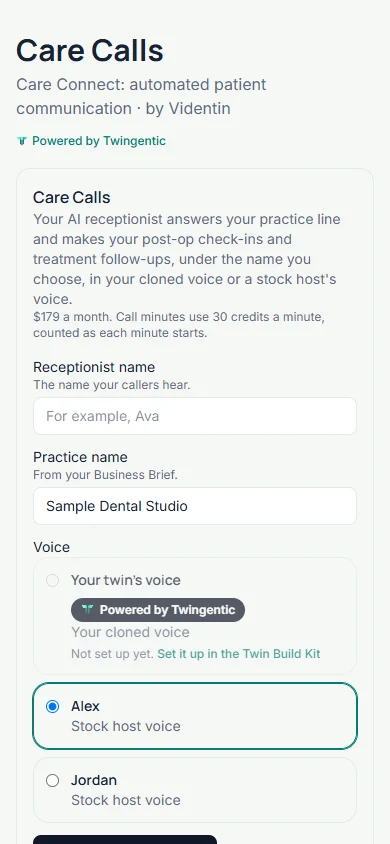
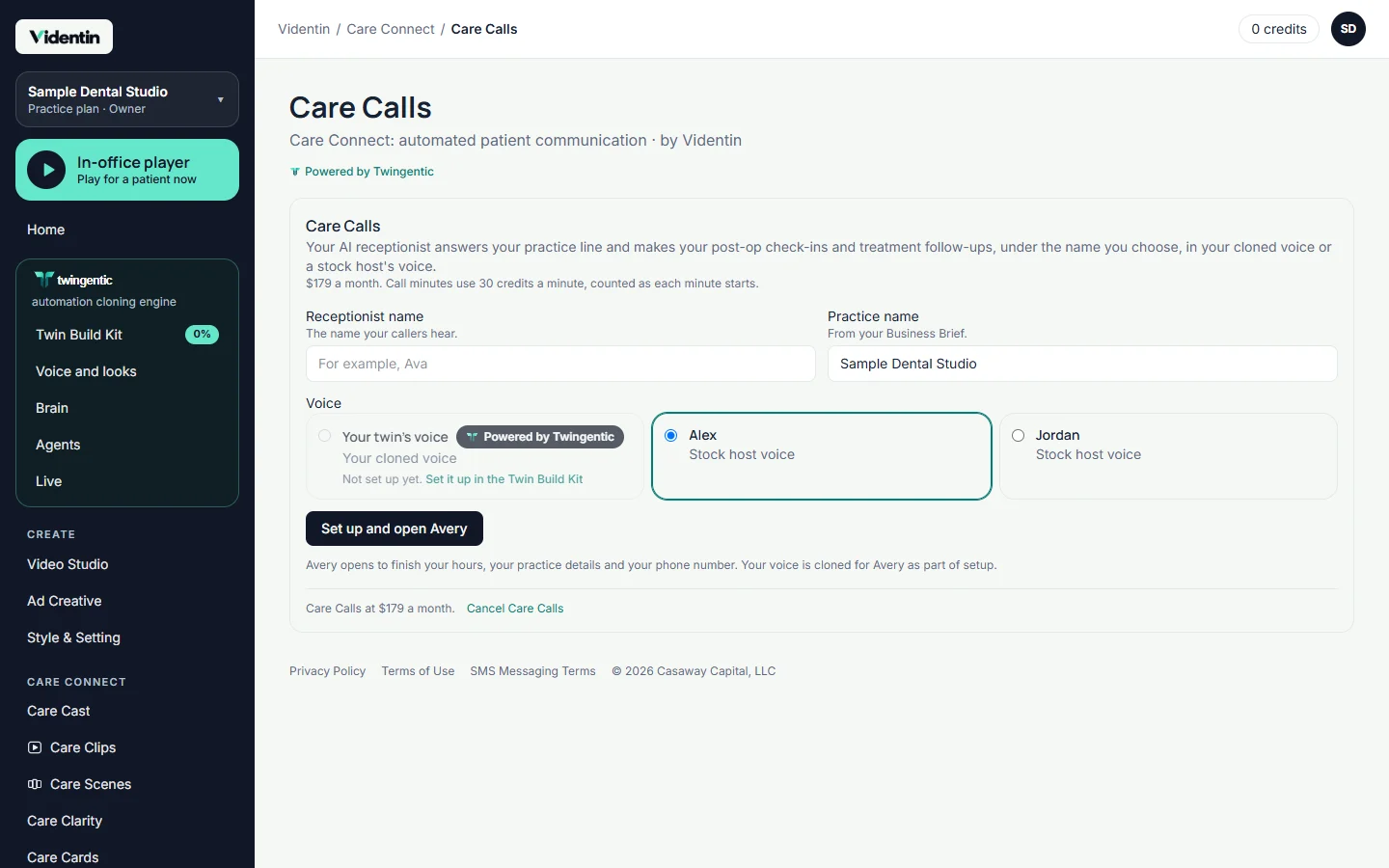
CARE CALLS · ADD-ON

Your twin answers the phone.

With Care Calls, your twin answers your practice line in your own voice, under the name you choose, and tells every caller it's an AI assistant. It also calls patients after treatment to check in. After a post-op check-in, the patient gets a text with the video page for their procedure.

  • Your voice, your receptionist name.
  • Post-op check-ins and treatment follow-ups you switch on or off.
  • The same Care Cast, Care Clarity videos and Care Cards your team sends, delivered after the call.

$179 a month, with call minutes at 30 credits a minute.

The Care Calls card: receptionist name, voice, status and call types
Real app screen. Sample data.

SEND CENTER

One place to send, schedule and see what was watched.

Your team adds a patient, drags in the Care Cast, Care Clarity videos, Care Cards or a saved Care Set, and sends by text or email, now or on a schedule. Or type the treatment in one sentence, "a root canal, an implant and a deep cleaning", and Videntin puts together the Care Package: each procedure's Care Cast, Care Clip and Care Cards from your library, ready to review and send. History shows what was sent, delivered, opened and watched, with resend on every row. Texts and emails cost nothing extra.

Need a link without a patient? Copy a link or print a QR code for chairside, your website or a handout.

Every Videntin plan includes a Business Associate Agreement, signed in the app before your first patient is added.

No app. No password. Just their videos.

The patient opens one page on any phone or computer: your intro, their videos in order, their care cards to read, your phone number, captions, and a follow-up chat that answers questions from the content on that page and points anything else to your office phone. The chat tells patients it's AI.

Chairside and in the waiting room, one button away.

The In-office player is one button from every screen in Videntin. Chairside, play the Care Cast or Care Clip you choose full screen and switch between them in one tap, or present its Care Scenes and draw on each step. In the waiting room, loop a playlist with captions on. Play on the screen in front of you, or pair any office screen with a short code.

CONNECTED · ADD-ON

Sends that follow your schedule.

Connected links to your practice management system. Tomorrow's appointments suggest their Before-care items, and at checkout the right After-care page goes to the patient automatically, by text or email. Works with Open Dental and Sikka.

Add Connected to any plan for $99 a month per connected location.

Two libraries in every plan

For patients:

Care Cast, Care Clips, Care Scenes, Care Clarity, Care Cards and the patient pages.

For your team:

Practice Playbook. See Practice Playbook

Plans

One Videntin ladder, billed monthly.

Solo

$249 a month

1 dentist

8 Care Clarity videos a month

4,000 credits a month

Billed monthly.

  • Care Connect (Care Cast library presented by Alex or Jordan, Care Clips, Care Scenes, Care Clarity, Care Cards, Send Center, In-office player, patient pages and follow-up chat)
  • Practice Playbook
  • Create, paid from your monthly credits
  • The Twin Build Kit, with a twin built for every dentist on the plan
  • Business Associate Agreement
Get started

Group

$1,249 a month

Up to 10 dentists

36 Care Clarity videos a month

25,000 credits a month

Billed monthly.

  • Care Connect (Care Cast library presented by Alex or Jordan, Care Clips, Care Scenes, Care Clarity, Care Cards, Send Center, In-office player, patient pages and follow-up chat)
  • Practice Playbook
  • Create, paid from your monthly credits
  • The Twin Build Kit, with a twin built for every dentist on the plan
  • Business Associate Agreement
Get started
  • Add Connected to any plan for $99 a month per connected location.
  • Add Care Calls to any plan for $179 a month.
  • One-time setup: $99 Care Clarity setup per practice.
  • Need videos made for you? See Custom production.

Your own likeness

Present Care Cast and the Practice Playbook yourself. Each is per presenting dentist, from:

  • Care Cast specialty packs $199 a pack
  • The whole Care Cast library, one time or monthly $1,499 one time or $99 a month
  • Practice Playbook category packs $199 a pack
  • The whole Playbook $799 one time or $59 a month
  • The Care Cast and Playbook bundle, one time or monthly $1,999 one time or $149 a month

Monthly options have a 12-month minimum.

Questions

Who reviews the clinical content?

Dr. Winslow clinically reviews every Care Cast master before it's released. Your Care Clarity videos and Care Cards are written by your practice.

What's the difference between Care Clips and Care Clarity?

Care Clips are silent procedure animations you explain in your own words. Care Clarity videos are your own written instructions, read word for word by your twin or a host.

Do I need to record anything?

A few photos and a short voice read set up your twin. Everything after that is made from them. Or skip the twin and let Alex or Jordan present.

Can I change the starter cards?

Yes. Every practice gets its own copy to edit, and your changes never affect anyone else.

What does it cost to text or email patients?

Nothing extra.

Is there a BAA?

Yes. Every Videntin plan includes a Business Associate Agreement, signed in the app before your first patient is added.

Is a Care Cast a substitute for informed consent?

No. It's a teaching aid that supports the conversation you have with your patient.

I'm a specialist. Do I only get my specialty's videos?

No. Your library opens on your specialty's pack, and every plan includes every video.

Let your patients hear from you.